

Your Completed Trades. In Your Journal. Automatically.
Connect MetaTrader 4 or MetaTrader 5 to Grayrock through a secure, read-only connector. Completed trades synchronize into your journal while supported open-position and account information stays visible in your Connections workspace.
- Read-only connection
- No broker password required
- No trade execution authority
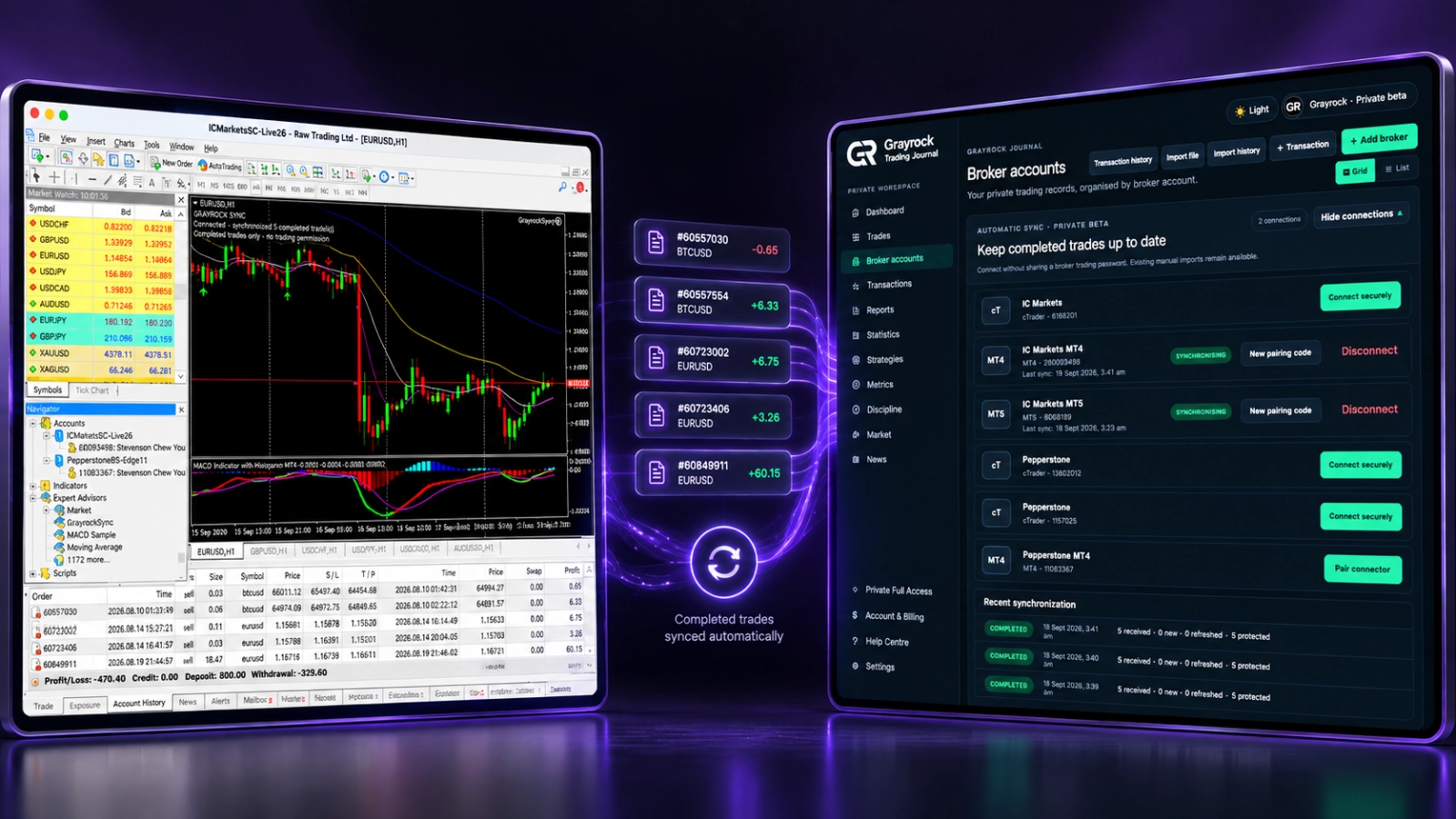
Connect Your Journal — Not Your Trading Authority.
Grayrock Sync receives supported trading information for journaling and review. It does not place, modify or close trades, or move money in your broker account.
No Broker Password
You do not send your broker master password or investor password to Grayrock. Your broker login remains inside MetaTrader.
No Trading Permission
GrayrockSync does not execute trades. Order placement, position changes and trade management remain in your broker platform.
One-Time Pairing
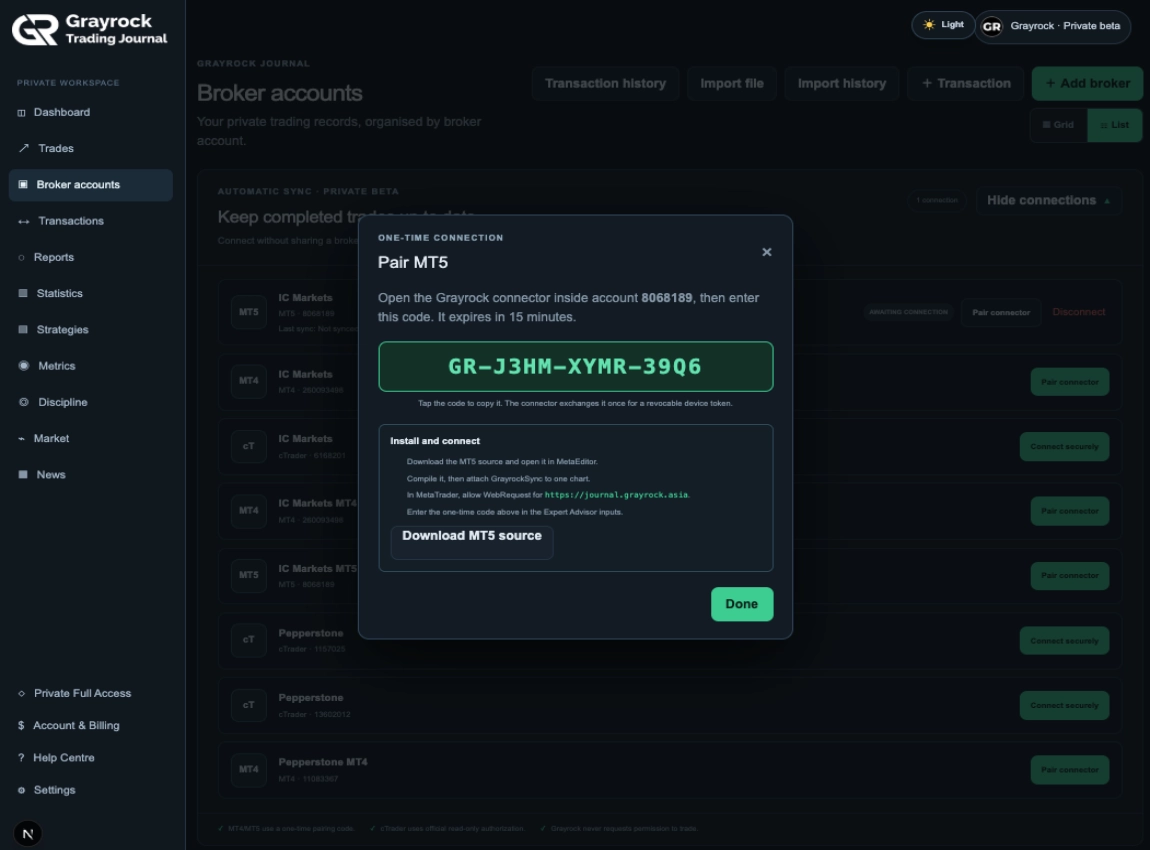
Pair the correct MetaTrader account using a short-lived, one-time code generated in Grayrock.
Pair Your Account. Keep the Connection in View.
Use a one-time pairing code to connect the selected Grayrock broker account with GrayrockSync in MetaTrader. Once paired, review synchronisation status and recent activity in your Connections workspace.
Pair the Correct Account.
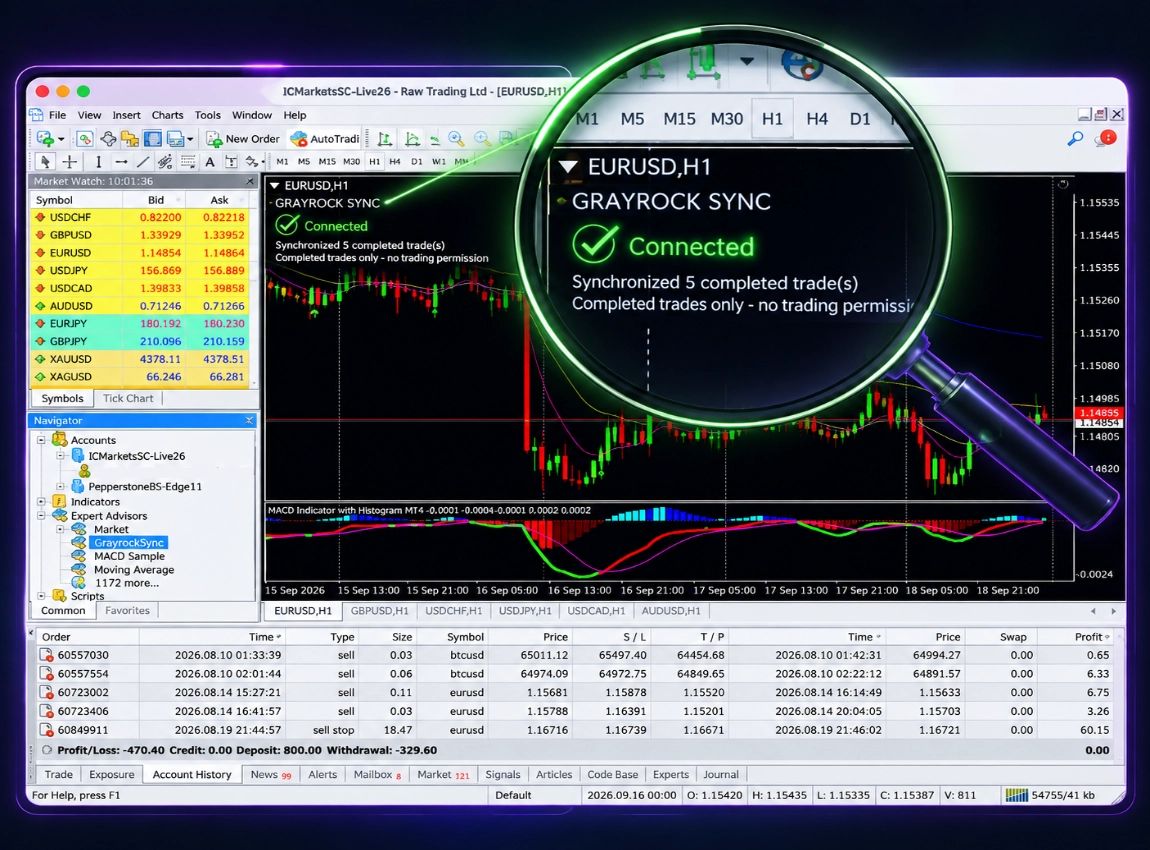
Check Synchronisation Status.
Manage the Connection.
The Details Needed for Meaningful Review.
While MetaTrader and GrayrockSync remain connected, supported completed trades can synchronise automatically into your journal. Each record stays associated with its broker account, ready for classifications, notes and performance review.
- Broker account & platform
- Symbol
- Quantity / lot size
- Entry price & Exit price
- Entry time & Exit time
- Stop Loss & Take Profit
- Gross profit or loss
- Commission
- Swap
- Available fees
- Net profit or loss
Supported balance, equity, available margin and open-position information can appear in Connections. Open positions remain separate from completed journal performance until they close and are received as completed trades.
Connect Your MetaTrader Terminal.
GrayrockSync runs inside a compatible MetaTrader desktop terminal. Add your account in Grayrock, install the matching connector and use a fresh one-time code to pair the connection.
1. Add Your Account
Add or select the broker account in Grayrock. Choose MetaTrader 4 or MetaTrader 5 to match the account you want to connect.
2. Install the Connector
Download the matching GrayrockSync source, compile it in MetaEditor and attach it to its own chart. Allow the Grayrock WebRequest address specified in the setup guide.
3. Pair the Account
Generate a fresh pairing code in Grayrock and enter it in the connector for the matching MetaTrader account. Complete pairing before the code expires.
4. Verify Synchronisation
Wait for the connector to show Connected, then check recent activity in Grayrock and confirm that supported completed trades have reached your journal.
About MetaTrader Sync
Find answers about connecting MT4 and MT5, pairing your account and keeping completed trade synchronisation running.
Does Grayrock need my broker password?
No. Grayrock Sync does not require your broker master password or investor password. MetaTrader connects using a short-lived pairing code and a revocable connector token.
Can Grayrock place or change trades?
No. GrayrockSync is read-only by design. It cannot place, modify or close trades or control your broker account.
Which MetaTrader platforms are supported?
Grayrock provides separate connectors for MetaTrader 4 and MetaTrader 5. Use the MT4 connector with MetaEditor 4 and the MT5 connector with MetaEditor 5.
Does it work with live accounts?
Yes, where the account and platform are supported. Grayrock Sync remains read-only whether the connected account is live or demo.
Must MetaTrader remain open?
Yes. MetaTrader must remain open, logged into the correct broker account, connected to the internet and running the chart containing GrayrockSync.
How frequently are trades synchronized?
The standard GrayrockSync configuration checks for updates every 60 seconds. Larger initial histories may require several synchronization cycles.
What happens after I restart my computer?
Restart MetaTrader and ensure the correct account, chart profile and GrayrockSync are running. A normally saved connection can resume without generating a new pairing code.
When would I need a new pairing code?
A new code is needed when establishing or re-establishing a connector connection, such as after reinstalling or moving MetaTrader to another computer. Pairing codes expire after 15 minutes and work only once.
Can I disconnect it?
Yes. Disconnecting stops future synchronization. Trades already synchronized into your journal remain available.
Will synchronized trades overwrite my manual journal entries?
Grayrock uses account and external trade identity to keep imported and synchronized records organised and protect against unintended duplicates. I would avoid promising that no manual record could ever conflict unless your production duplicate logic guarantees that exact scenario.
Are open trades synchronized?
Supported open-position information can be displayed under Connections → Open Positions for read-only monitoring. Open positions do not contribute to Net P/L, win rate, profit factor or other completed-trade statistics until they close and are received as completed trades.
Will it continue syncing if the browser is closed?
Yes. The Grayrock browser tab does not need to remain open after setup. MetaTrader, the correct account, the chart containing GrayrockSync and the internet connection must remain active. GRAYROCK-BROKER-SYNC-HELP-PAGE-…
Stop Exporting Yesterday's Trades by Hand.
Connect MT4 or MT5 once and keep supported completed trades flowing into your Grayrock journal for structured review.